Dark Mode Annotator ∙ Figma Plugin
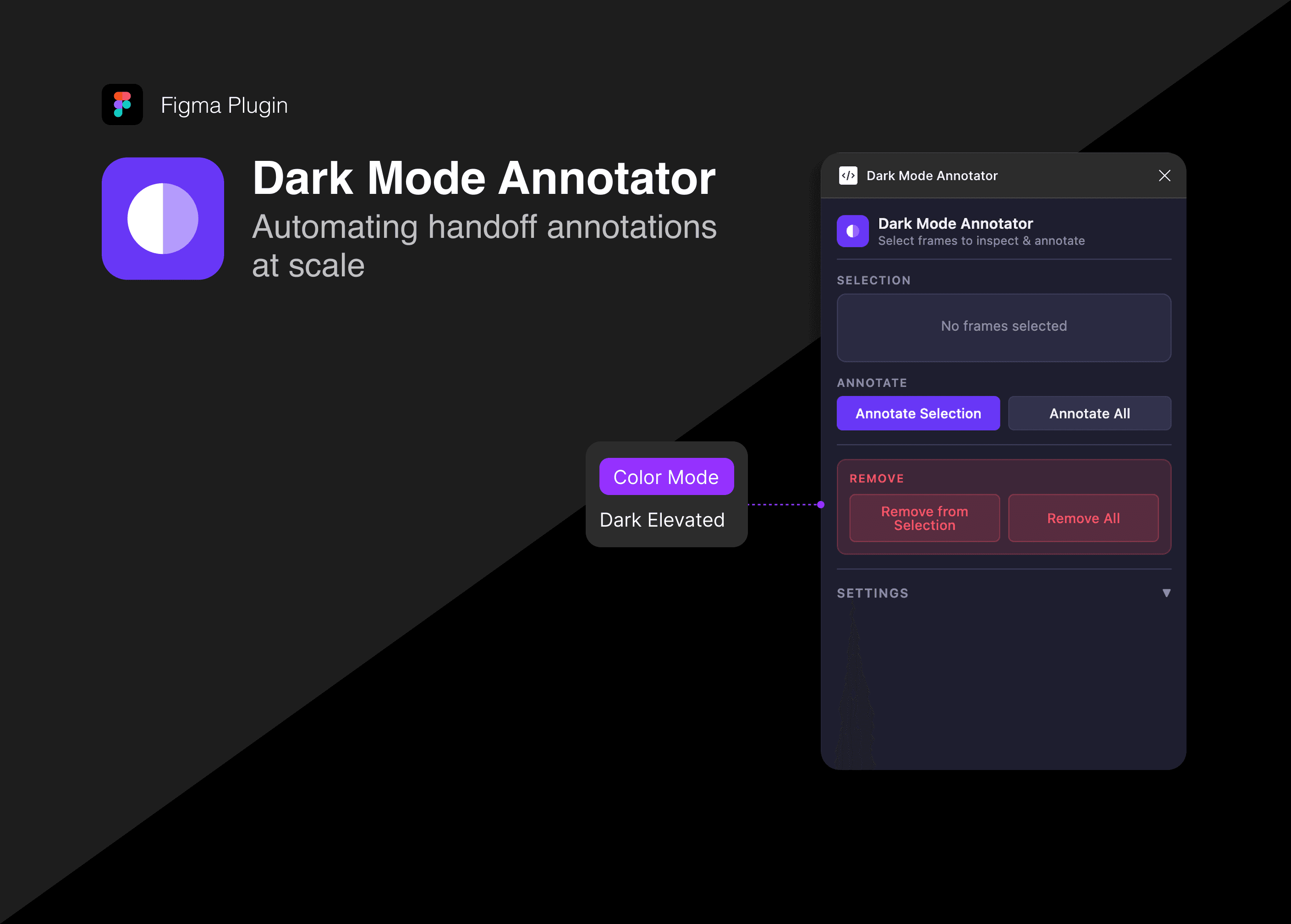
A plugin that automatically detects and annotates the correct dark color mode palette on every frame for seamless handoff.
Claude Code
Figma
01 ∙ Problem
My team's design system has 2 color modes for dark mode, to create visual hierarchy, represent elevation, and improve readability, similar to the iOS Design System. Dark Mode applies to root views, navigation, and list screens. Dark Elevated applies to sheets, modals, alerts, and anything that floats above the base layer.
We design in Light Mode, so every screen handed off to engineering was missing that information. Developers had to guess, which introduced color bugs. Annotating each and every screen was tedious and often missed in the process, and with thousands of screens this was unsustainable.
Before
A designer manually opens the annotation tool, writes the annotation, picks the correct tag from a dropdown, resulting in 12 seconds per screen. With 1,000+ screens, this is hours of work that nobody wants to do.
After
Click "Annotate All." The plugin processes every frame on the page in one pass in ~1 second total. Annotations appear in natively exactly where developers already look.
02 ∙ Insight
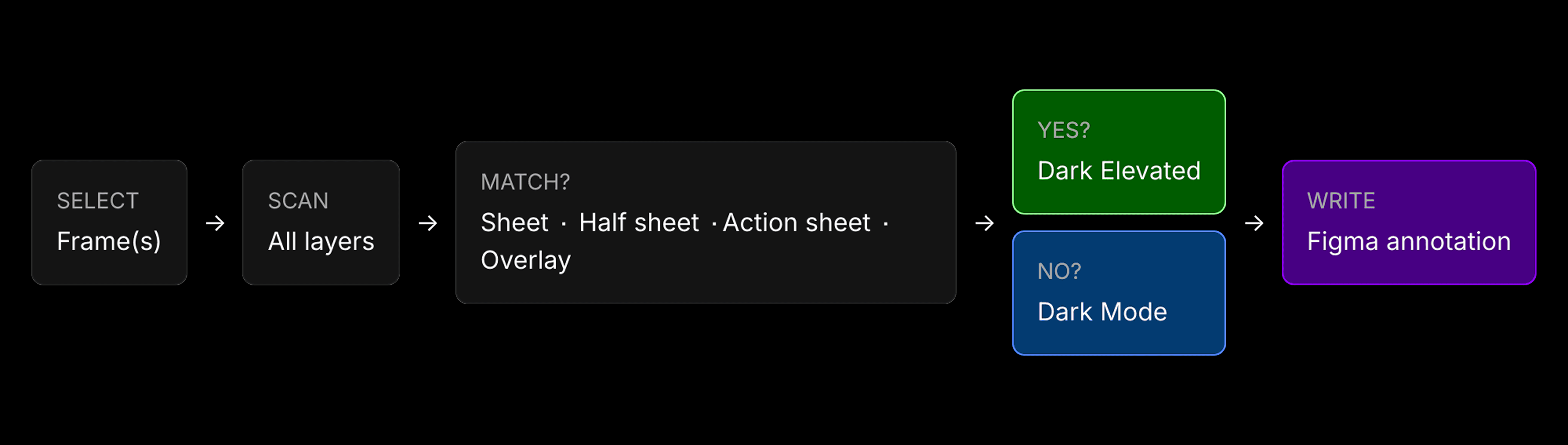
The correct dark mode is already encoded in the design. Sheets, modals, and overlays have consistent component names in our design system. If a frame contains a layer named "Half Sheet" or "Action Sheet," it's Dark Elevated. If not, it's Dark Mode.
The plugin scans through the screen's layers, and reads that signal automatically so designers don't have to.
03 ∙ How it works
The plugin recursively scans every layer inside a selected frame, checking component names against four keywords: sheet, half sheet, action sheet, overlay. On first match, the frame is classified as Dark Elevated. No match means Dark Mode.
The result is written as a native Figma annotation, visible in Figma's Dev Mode where developers are already inspecting the design.
3 controls cover every use case:
Annotate Selection -> runs detection on selected frames
Annotate All -> processes every top-level frame on the page in one pass
Manual Override -> lets a designer pin a frame to a specific mode when the layer naming doesn't reflect the intent
04 ∙ Impact
Before, manually creating just one annotation took 12 seconds per screen. Now, with the plugin, creating an annotation takes ~1 second for all the screens selected at once. With 1,000+ screens, this saves hours of tedious work.
BEFORE
Manually writing an annotation
after
Generating an annotation with the plugin
View more work
Dark Mode Annotator ∙ Figma Plugin
A plugin that automatically detects and annotates the correct dark color mode palette on every frame for seamless handoff.
Claude Code
Figma
01 ∙ Problem
My team's design system has 2 color modes for dark mode, to create visual hierarchy, represent elevation, and improve readability, similar to the iOS Design System. Dark Mode applies to root views, navigation, and list screens. Dark Elevated applies to sheets, modals, alerts, and anything that floats above the base layer.
We design in Light Mode, so every screen handed off to engineering was missing that information. Developers had to guess, which introduced color bugs. Annotating each and every screen was tedious and often missed in the process, and with thousands of screens this was unsustainable.
Before
A designer manually opens the annotation tool, writes the annotation, picks the correct tag from a dropdown, resulting in 12 seconds per screen. With 1,000+ screens, this is hours of work that nobody wants to do.
After
Click "Annotate All." The plugin processes every frame on the page in one pass in ~1 second total. Annotations appear in natively exactly where developers already look.
02 ∙ Insight
The correct dark mode is already encoded in the design. Sheets, modals, and overlays have consistent component names in our design system. If a frame contains a layer named "Half Sheet" or "Action Sheet," it's Dark Elevated. If not, it's Dark Mode.
The plugin scans through the screen's layers, and reads that signal automatically so designers don't have to.
03 ∙ How it works
The plugin recursively scans every layer inside a selected frame, checking component names against four keywords: sheet, half sheet, action sheet, overlay. On first match, the frame is classified as Dark Elevated. No match means Dark Mode.
The result is written as a native Figma annotation, visible in Figma's Dev Mode where developers are already inspecting the design.
3 controls cover every use case:
Annotate Selection -> runs detection on selected frames
Annotate All -> processes every top-level frame on the page in one pass
Manual Override -> lets a designer pin a frame to a specific mode when the layer naming doesn't reflect the intent
04 ∙ Impact
Before, manually creating just one annotation took 12 seconds per screen. Now, with the plugin, creating an annotation takes ~1 second for all the screens selected at once. With 1,000+ screens, this saves hours of tedious work.
BEFORE
Manually writing an annotation
after
Generating an annotation with the plugin