SoundPrint
Turn audio into art ∙ An exploration stemming from Sights & Sounds of Memory Lane
Audio Visualizer
Claude Code
p5.js
Context
Exploration stemming from my Thesis
tools
Claude Code, p5.js, HTML/CSS, JavaScript
Where this comes from
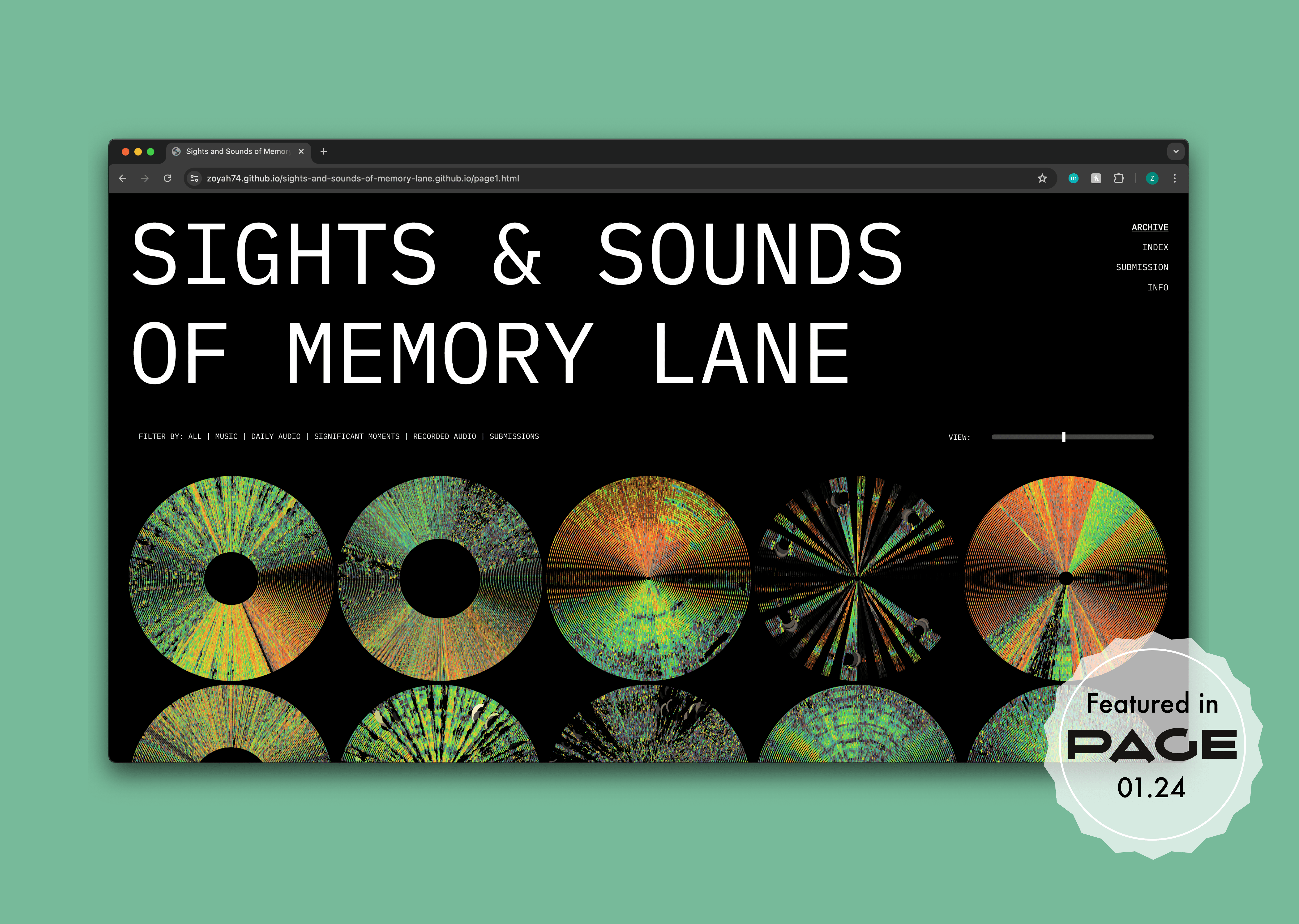
Sights & Sounds of Memory Lane
My thesis explores how audio shapes memory. How a song can collapse time, returning you to a specific room, light, or feeling. The original work is a fully digital archive website where personal audio files are transformed into generative visualizations using Processing and the Minim library.
The question that branched off
What if the music itself could draw the image?
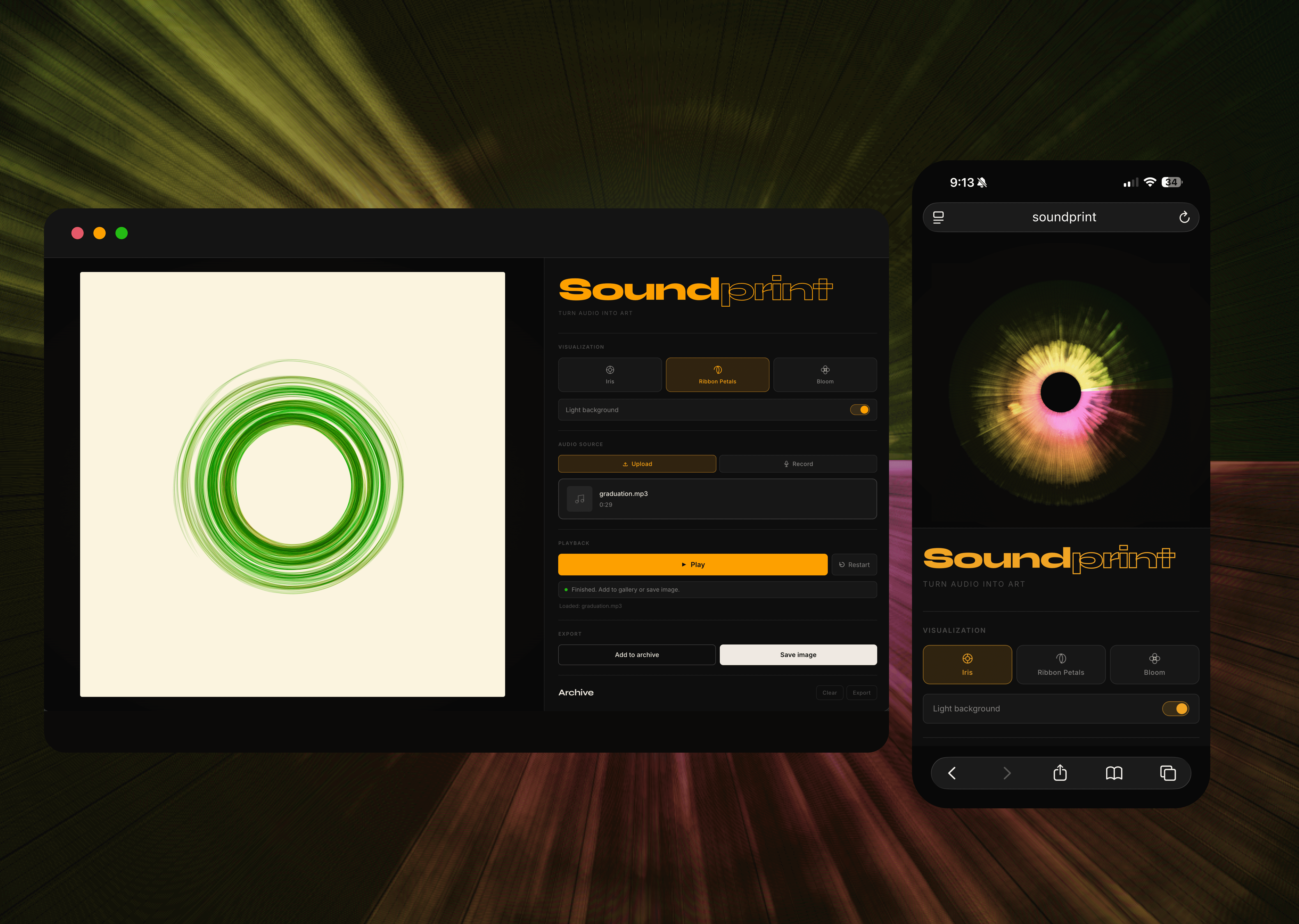
Sights & Sounds of Memory Lane used recorded audio files: specific memories, specific dates. SoundPrint asks a different question: what if the visualization were live? SoundPrint is a browser tool that uses real-time frequency analysis to generate circular, iris-like artwork directly from any audio you play into it.
01 ∙ Challenge
During my thesis, Sights & Sounds of Memory Lane, I built a generative visualizer in Processing and Minim that transformed audio files into circular, amplitude-driven artwork. The concept was clear. The question was real. But I spent countless hours just learning enough code to make the visual happen at all. Technical capability was the bottleneck, not design thinking.
SoundPrint started from a simple question: what would I have made if the tools weren't in the way? What if the hours I spent fighting code could go entirely toward the design decisions: what the visual maps to, what it feels like, which musical textures it rewards?
There was also a structural limitation in the thesis. Even when people submitted audio to the archive, the pipeline was: someone submits an audio through the website → I run the Processing script on my own machine → I upload the resulting image to the website. The visualization was never truly in anyone else's hands. SoundPrint asks what happens when anyone can generate their own in the browser, without me involved at all.
Anyone can use it
Upload audio → instantly see your own visualization. No account, no download, no me involved. The archive belongs to the person listening.
The question that branched off
The generated images needed to be things people actually want to save. Something emotive.
MUSIC SHOULD FEEL DIFFERENT
A pop song and classical song should produce visibly, emotionally different outputs. The visual is a direct translation, not a decoration
02 ∙ process
During my thesis, I spent a disproportionate amount of time just learning enough Processing and Minim to make the visualizer work at all. The ideas moved faster than my ability to implement them. That friction didn't kill the project, but it shaped what was possible. Some directions were simply too technically costly to explore in the timeframe I had.
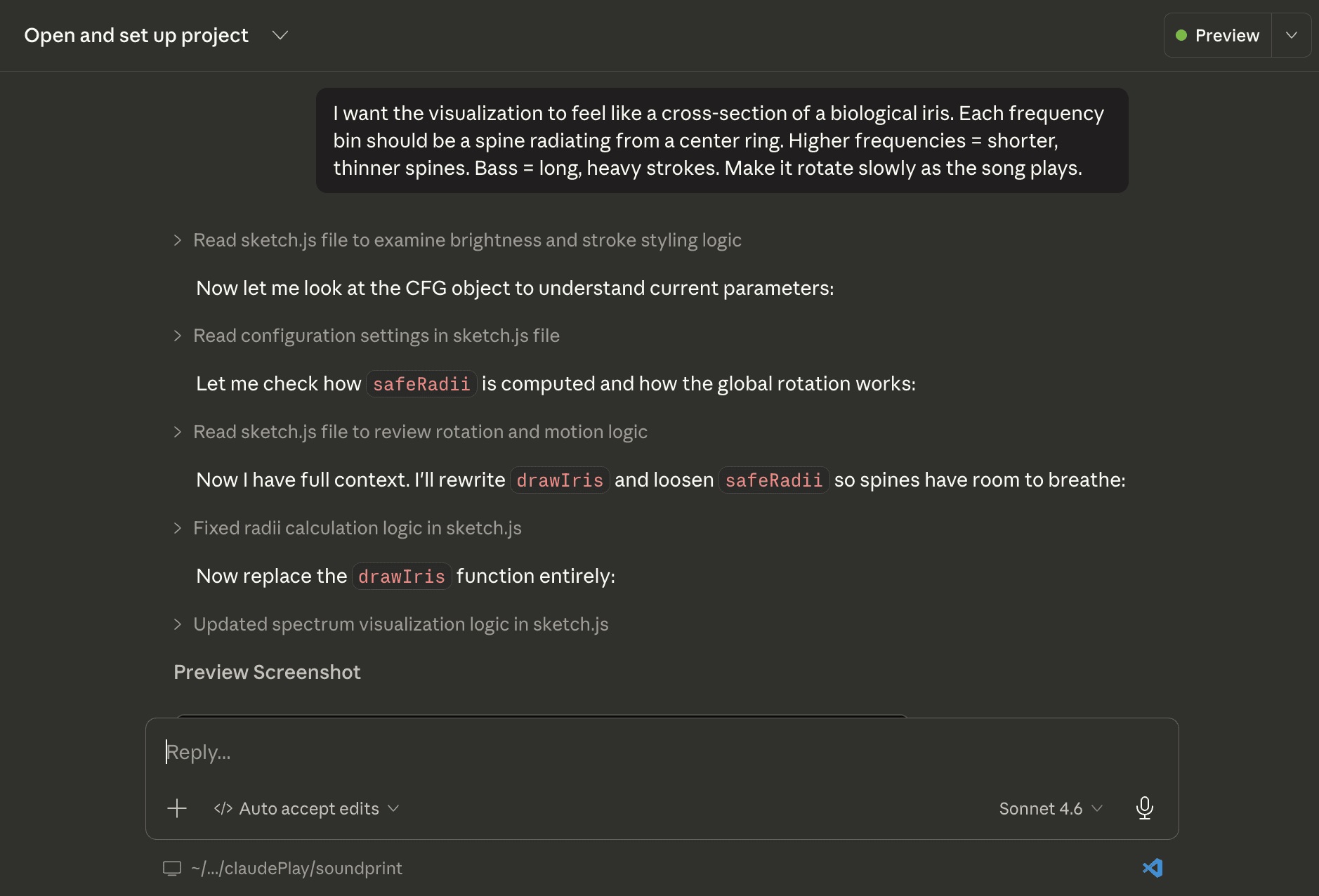
Using Claude Code for SoundPrint changed that entirely. For the first time, the speed of design thinking and the speed of implementation were the same. I described what the visualization should feel like, and Claude Code wrote and iterated the p5.js. A change that would have taken me a day to research and implement, for example adding gamma correction, hooking up color to be dynamic with the audio input, suddenly could happen in a single prompt exchange.
The other shift was about who has access. In Sights & Sounds of Memory Lane, every visualization in the archive was one I had created and uploaded myself. Even when people submitted audio through the public form, I was still the bottleneck: receive audio, run the Processing script on my own machine, export the image, upload it to the site. SoundPrint removes that step entirely. Anyone opens the browser, drops in their audio, and their own visualization appears. No manual step, no me in the loop.
What i brought to every session
The design vocabulary. Knowing that "organic" means Perlin noise rather than random jitter. Knowing that Screen and Multiply aren't just technical blend modes, they carry completely different emotional registers. Knowing when the output looked like data and when it looked like art, and being able to describe the difference precisely. The iris metaphor, circular, biologically resonant, radiating from a center, came directly from the thesis work on synesthesia and sensory overlap. That design knowledge was built intentionally; Claude Code just gave it somewhere to go.
What claude code brought
The implementation fluency. p5.js, FFT bin analysis, HSB color math, Perlin noise timing, pixel density rendering, MediaRecorder API for microphone input, jsmediatags for album art extraction. Each of these would have taken me weeks to learn independently, the same kind of weeks that disappeared in the thesis just getting the Processing script to run. A change that might have taken a day took just a single prompt. That speed changed what was possible to explore.
Claude Code as a collaborator
Terminology
SoundPrint uses real-time audio analysis to drive its visuals. Below are some of the core concepts used in this project.
FFT ∙ fast fourier transfer
Audio is, at its core, a pressure wave. A single value changing thousands of times per second. FFT is the mathematical operation that takes that stream and breaks it into its component frequencies: how much bass, how much mid-range, how much treble is present right now. Instead of seeing a waveform (one value over time), FFT gives you a spectrum, hundreds of separate frequency measurements, updated many times per second. This is what SoundPrint actually draws from. The iris doesn't visualize sound; it visualizes a frequency map of sound.
Audio is, at its core, a pressure wave. A single value changing thousands of times per second. FFT is the mathematical operation that takes that stream and breaks it into its component frequencies: how much bass, how much mid-range, how much treble is present right now. Instead of seeing a waveform (one value over time), FFT gives you a spectrum, hundreds of separate frequency measurements, updated many times per second. This is what SoundPrint actually draws from. The iris doesn't visualize sound; it visualizes a frequency map of sound.
frequency spectrum
The range of pitches in a sound, from deep bass (~20Hz, the rumble you feel in your chest) to high treble (~20kHz, the shimmer of cymbals). FFT divides this range into hundreds of frequency "bins," each representing a narrow slice of the spectrum. In the Iris visualization, the bins are spread around the circle from lowest to highest frequency, so bass frequencies live on one arc and high frequencies on the other. A track heavy in bass produces long, thick spines on one side; a track with lots of high-frequency content produces activity on the opposite arc.
amplitude
How loud a given frequency is at a specific moment. For each frequency bin, FFT returns an amplitude value (essentially the volume of that particular pitch right now). In the Iris mode, amplitude directly controls the length and weight of each spine: high amplitude = long, heavy stroke; low amplitude = short, thin one. In Bloom mode it controls the radius of each dot. Amplitude is the main variable connecting the audio to the visual, it's what makes the output change with every song and every moment of playback.
How loud a given frequency is at a specific moment. For each frequency bin, FFT returns an amplitude value (essentially the volume of that particular pitch right now). In the Iris mode, amplitude directly controls the length and weight of each spine: high amplitude = long, heavy stroke; low amplitude = short, thin one. In Bloom mode it controls the radius of each dot. Amplitude is the main variable connecting the audio to the visual, it's what makes the output change with every song and every moment of playback.
gamma correction
Raw FFT amplitude data has a problem: it clusters heavily at the low end. In most music, most frequencies are quiet most of the time, with occasional loud spikes. If you visualize that directly, quiet passages produce almost no visual activity. Gamma correction is a mathematical curve, raising values to a fractional exponent, that redistributes the data so quiet frequencies still contribute meaningfully to the drawing. It's the same principle used in photography and screen calibration to make midtones look natural. A technical fix with a purely aesthetic motivation.
04 ∙ Solution
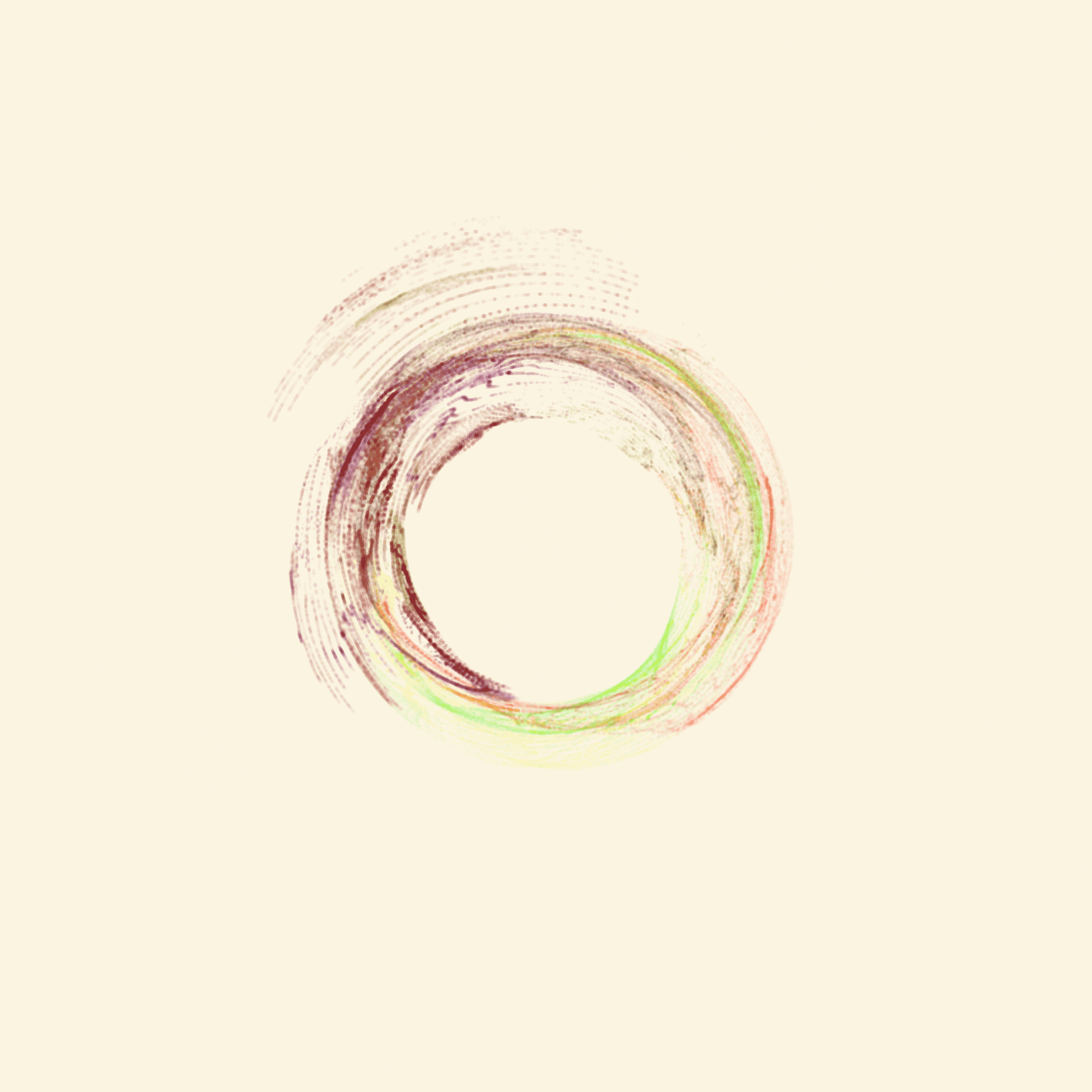
Rather than building one visualization style, I designed three. Each with a distinct aesthetic identity that suits different kinds of music. The constraint was that all three had to use the same underlying FFT data; the difference had to come from how that data was rendered, not what it was.
iris
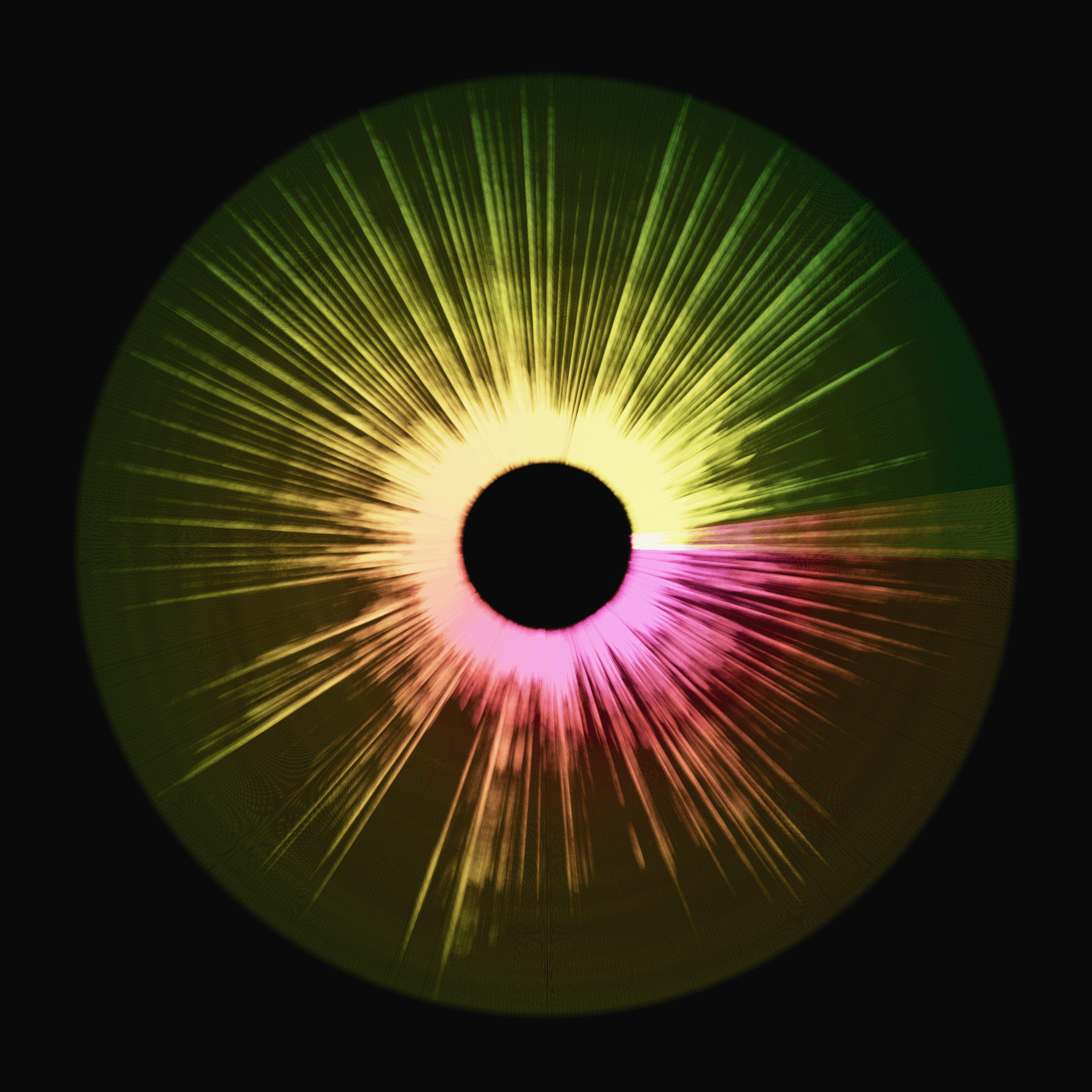
72 spines per rotation, each mapped to an FFT bin. Spine length and weight track amplitude. Hue shifts along the spectrum from bass to high frequencies. Best for dense, layered music with strong sub-bass.
ribbon petals
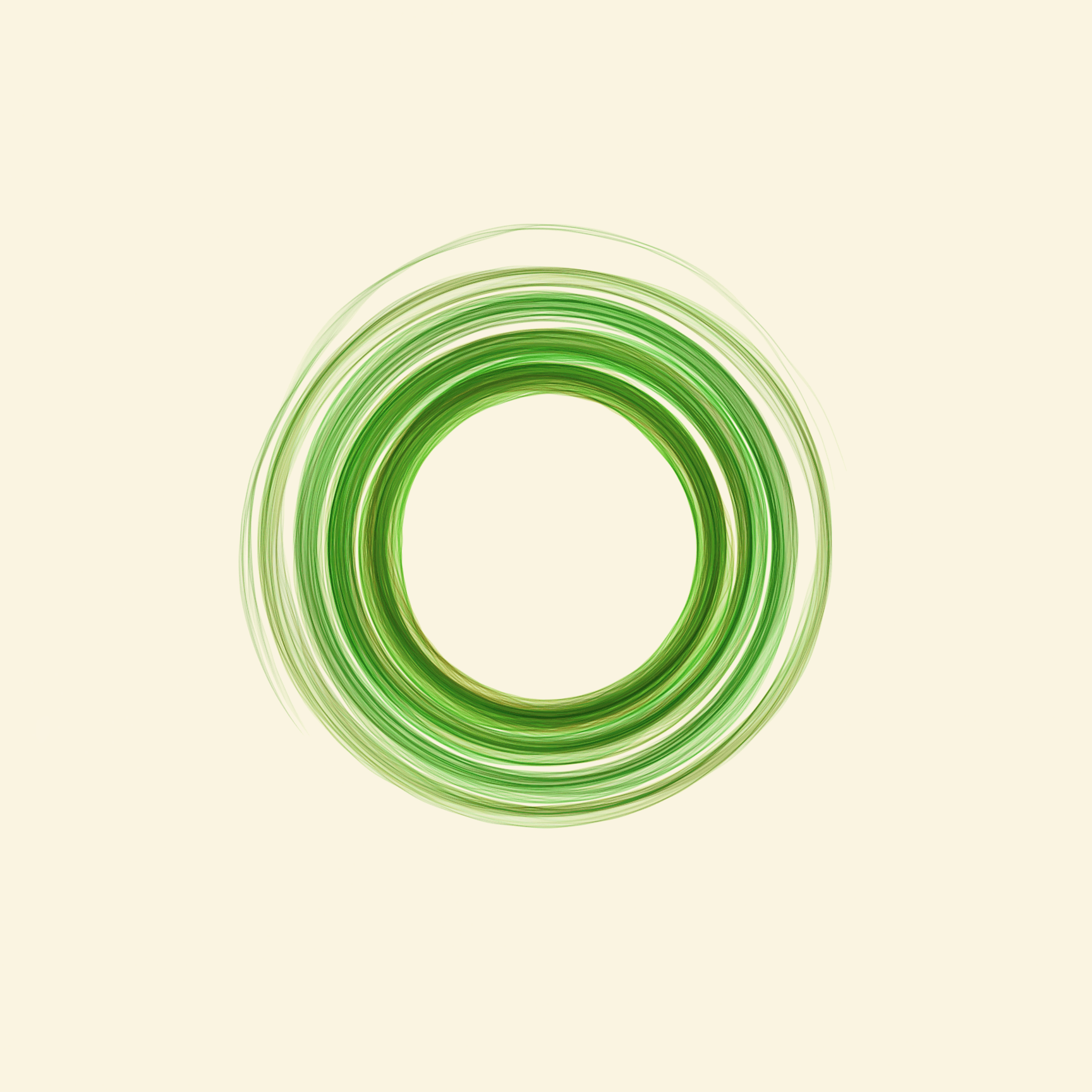
Bezier paths rather than straight spines, creating a wispy, flowing petal effect. The curve width is modulated by mid-frequency energy. Best for ambient, instrumental, or slow-tempo music.
Bloom
Circles instead of lines, with radius tracking amplitude. Uses Multiply blend to produce saturated, ink-like density that lifts with silence. Best for acoustic, jazz, and sparse arrangements.
05 ∙ the website
upload or record
Two audio inputs: file upload (mp3, wav, ogg, m4a — with album art pulled from ID3 metadata) and live microphone recording with a real-time elapsed timer. Recorded clips appear as cards that can be tapped to re-record.
archive and save
Snapshots can be added to a persistent local archive gallery (up to 90 images, titled and timestamped) or downloaded immediately as PNG to your device.
06 ∙ craft
Five specific technical choices that each had a design motivation — places where the code and the aesthetics are inseparable.
01
Gamma correction on FFT data
Raw FFT amplitude values cluster heavily at the low end, quiet passages produce almost no visual activity, while loud moments spike. I applied a gamma curve (exponent 1.25) to redistribute energy perceptually. Soft passages still produce interesting shapes. A technical fix with a design motivation.
02
Perlin noise for organic jitter
Each spine's angle is offset by a Perlin noise value keyed to both its position and playback time. The result is that spines wobble slowly and organically rather than staying perfectly rigid. This single addition took the visualization from feeling algorithmic to feeling alive.
03
Screen vs. Multiply
The light/dark background switch doesn't just change the canvas color. Dark mode uses Screen blend (additive—colors glow into the black). Light mode uses Multiply (subtractive—layers of color build to rich, dense ink). The same FFT data produces a completely different emotional register depending on this one variable. An early prototype using Screen on a white background looked washed out and wrong; switching to Multiply was an immediate transformation.
04
Rotation tied to playback position
The iris doesn't spin at a constant speed, its rotation angle is proportional to how far through the song you are, completing one full revolution over the track's duration. This means every song produces a uniquely shaped record of its own time. The iris you see at the end of a 3-minute pop song and a 10-minute ambient piece will have traveled the same angular distance, but through entirely different terrain.
View more work
SoundPrint
Turn audio into art ∙ An exploration stemming from Sights & Sounds of Memory Lane
Audio Visualizer
Claude Code
p5.js
Context
Exploration stemming from my Thesis
tools
Claude Code, p5.js, HTML/CSS, JavaScript
Where this comes from
Sights & Sounds of Memory Lane
My thesis explores how audio shapes memory. How a song can collapse time, returning you to a specific room, light, or feeling. The original work is a fully digital archive website where personal audio files are transformed into generative visualizations using Processing and the Minim library.
The question that branched off
What if the music itself could draw the image?
Sights & Sounds of Memory Lane used recorded audio files: specific memories, specific dates. SoundPrint asks a different question: what if the visualization were live? SoundPrint is a browser tool that uses real-time frequency analysis to generate circular, iris-like artwork directly from any audio you play into it.
01 ∙ Challenge
During my thesis, Sights & Sounds of Memory Lane, I built a generative visualizer in Processing and Minim that transformed audio files into circular, amplitude-driven artwork. The concept was clear. The question was real. But I spent countless hours just learning enough code to make the visual happen at all. Technical capability was the bottleneck, not design thinking.
SoundPrint started from a simple question: what would I have made if the tools weren't in the way? What if the hours I spent fighting code could go entirely toward the design decisions: what the visual maps to, what it feels like, which musical textures it rewards?
There was also a structural limitation in the thesis. Even when people submitted audio to the archive, the pipeline was: someone submits an audio through the website → I run the Processing script on my own machine → I upload the resulting image to the website. The visualization was never truly in anyone else's hands. SoundPrint asks what happens when anyone can generate their own in the browser, without me involved at all.
Anyone can use it
Upload audio → instantly see your own visualization. No account, no download, no me involved. The archive belongs to the person listening.
The question that branched off
The generated images needed to be things people actually want to save. Something emotive.
MUSIC SHOULD FEEL DIFFERENT
A pop song and classical song should produce visibly, emotionally different outputs. The visual is a direct translation, not a decoration
02 ∙ process
During my thesis, I spent a disproportionate amount of time just learning enough Processing and Minim to make the visualizer work at all. The ideas moved faster than my ability to implement them. That friction didn't kill the project, but it shaped what was possible. Some directions were simply too technically costly to explore in the timeframe I had.
Using Claude Code for SoundPrint changed that entirely. For the first time, the speed of design thinking and the speed of implementation were the same. I described what the visualization should feel like, and Claude Code wrote and iterated the p5.js. A change that would have taken me a day to research and implement, for example adding gamma correction, hooking up color to be dynamic with the audio input, suddenly could happen in a single prompt exchange.
The other shift was about who has access. In Sights & Sounds of Memory Lane, every visualization in the archive was one I had created and uploaded myself. Even when people submitted audio through the public form, I was still the bottleneck: receive audio, run the Processing script on my own machine, export the image, upload it to the site. SoundPrint removes that step entirely. Anyone opens the browser, drops in their audio, and their own visualization appears. No manual step, no me in the loop.
What i brought to every session
The design vocabulary. Knowing that "organic" means Perlin noise rather than random jitter. Knowing that Screen and Multiply aren't just technical blend modes, they carry completely different emotional registers. Knowing when the output looked like data and when it looked like art, and being able to describe the difference precisely. The iris metaphor, circular, biologically resonant, radiating from a center, came directly from the thesis work on synesthesia and sensory overlap. That design knowledge was built intentionally; Claude Code just gave it somewhere to go.
What claude code brought
The implementation fluency. p5.js, FFT bin analysis, HSB color math, Perlin noise timing, pixel density rendering, MediaRecorder API for microphone input, jsmediatags for album art extraction. Each of these would have taken me weeks to learn independently, the same kind of weeks that disappeared in the thesis just getting the Processing script to run. A change that might have taken a day took just a single prompt. That speed changed what was possible to explore.
Claude Code as a collaborator
Terminology
SoundPrint uses real-time audio analysis to drive its visuals. Below are some of the core concepts used in this project.
FFT ∙ fast fourier transfer
Audio is, at its core, a pressure wave. A single value changing thousands of times per second. FFT is the mathematical operation that takes that stream and breaks it into its component frequencies: how much bass, how much mid-range, how much treble is present right now. Instead of seeing a waveform (one value over time), FFT gives you a spectrum, hundreds of separate frequency measurements, updated many times per second. This is what SoundPrint actually draws from. The iris doesn't visualize sound; it visualizes a frequency map of sound.
frequency spectrum
The range of pitches in a sound, from deep bass (~20Hz, the rumble you feel in your chest) to high treble (~20kHz, the shimmer of cymbals). FFT divides this range into hundreds of frequency "bins," each representing a narrow slice of the spectrum. In the Iris visualization, the bins are spread around the circle from lowest to highest frequency, so bass frequencies live on one arc and high frequencies on the other. A track heavy in bass produces long, thick spines on one side; a track with lots of high-frequency content produces activity on the opposite arc.
amplitude
How loud a given frequency is at a specific moment. For each frequency bin, FFT returns an amplitude value (essentially the volume of that particular pitch right now). In the Iris mode, amplitude directly controls the length and weight of each spine: high amplitude = long, heavy stroke; low amplitude = short, thin one. In Bloom mode it controls the radius of each dot. Amplitude is the main variable connecting the audio to the visual, it's what makes the output change with every song and every moment of playback.
gamma correction
Raw FFT amplitude data has a problem: it clusters heavily at the low end. In most music, most frequencies are quiet most of the time, with occasional loud spikes. If you visualize that directly, quiet passages produce almost no visual activity. Gamma correction is a mathematical curve, raising values to a fractional exponent, that redistributes the data so quiet frequencies still contribute meaningfully to the drawing. It's the same principle used in photography and screen calibration to make midtones look natural. A technical fix with a purely aesthetic motivation.
04 ∙ Solution
Rather than building one visualization style, I designed three. Each with a distinct aesthetic identity that suits different kinds of music. The constraint was that all three had to use the same underlying FFT data; the difference had to come from how that data was rendered, not what it was.
iris
72 spines per rotation, each mapped to an FFT bin. Spine length and weight track amplitude. Hue shifts along the spectrum from bass to high frequencies. Best for dense, layered music with strong sub-bass.
ribbon petals
Bezier paths rather than straight spines, creating a wispy, flowing petal effect. The curve width is modulated by mid-frequency energy. Best for ambient, instrumental, or slow-tempo music.
Bloom
Circles instead of lines, with radius tracking amplitude. Uses Multiply blend to produce saturated, ink-like density that lifts with silence. Best for acoustic, jazz, and sparse arrangements.
05 ∙ the website
upload or record
Two audio inputs: file upload (mp3, wav, ogg, m4a — with album art pulled from ID3 metadata) and live microphone recording with a real-time elapsed timer. Recorded clips appear as cards that can be tapped to re-record.
archive and save
Snapshots can be added to a persistent local archive gallery (up to 90 images, titled and timestamped) or downloaded immediately as PNG to your device.
06 ∙ craft
Five specific technical choices that each had a design motivation — places where the code and the aesthetics are inseparable.
01
Gamma correction on FFT data
Raw FFT amplitude values cluster heavily at the low end, quiet passages produce almost no visual activity, while loud moments spike. I applied a gamma curve (exponent 1.25) to redistribute energy perceptually. Soft passages still produce interesting shapes. A technical fix with a design motivation.
02
Perlin noise for organic jitter
Each spine's angle is offset by a Perlin noise value keyed to both its position and playback time. The result is that spines wobble slowly and organically rather than staying perfectly rigid. This single addition took the visualization from feeling algorithmic to feeling alive.
03
Screen vs. Multiply
The light/dark background switch doesn't just change the canvas color. Dark mode uses Screen blend (additive—colors glow into the black). Light mode uses Multiply (subtractive—layers of color build to rich, dense ink). The same FFT data produces a completely different emotional register depending on this one variable. An early prototype using Screen on a white background looked washed out and wrong; switching to Multiply was an immediate transformation.
04
Rotation tied to playback position
The iris doesn't spin at a constant speed, its rotation angle is proportional to how far through the song you are, completing one full revolution over the track's duration. This means every song produces a uniquely shaped record of its own time. The iris you see at the end of a 3-minute pop song and a 10-minute ambient piece will have traveled the same angular distance, but through entirely different terrain.