RUNYC
Cultivating a community through running. An app to discover run clubs in NYC, interact with community members, and log your runs.
UI/UX
Prototyping
React
01 ∙ overview
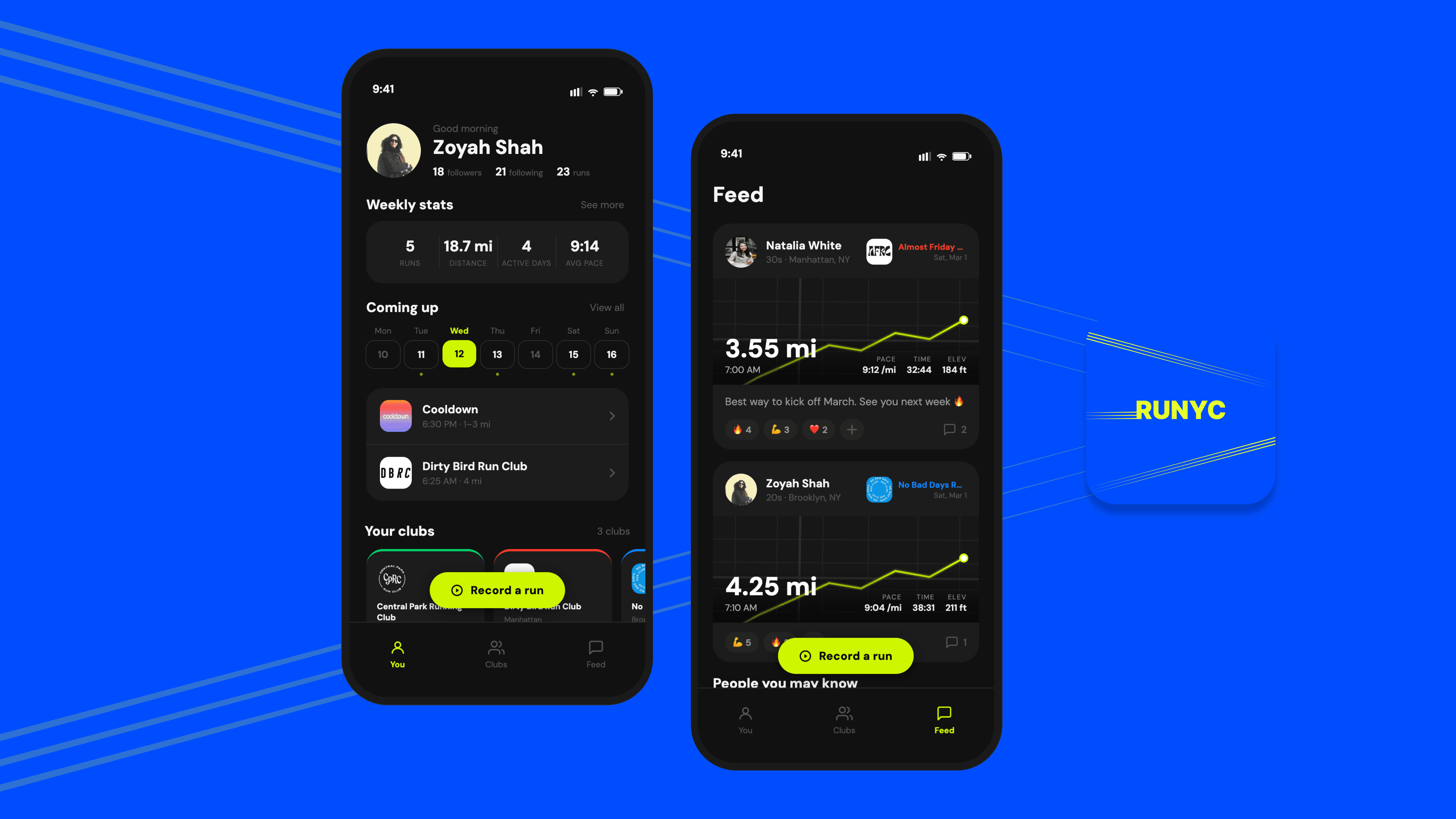
RUNYC is a mobile app that allows you to discover run clubs across the 5 boroughs of New York City, interact with community members, and log your runs. This project began as a Figma prototype and evolved into a fully interactive coded prototype built in React with the help of Claude Code.
As the popularity of running clubs continues to grow, the need for a centralized platform to discover and engage with these communities has become increasingly apparent. RUNYC addresses this need by offering users a comprehensive directory of run clubs, facilitating interaction among members, and fostering a sense of community. RUNYC aims to enhance the experience of run clubs and promote active participation in a community of like-minding individuals.
This case study covers the design thinking behind the concept, the key decisions made in Figma, and what it was like to bridge from mockups to a working prototype using AI (Claude Code) as a collaborator.
02 ∙ challenge
I started by auditing the existing landscape for both running apps and social media apps where runners typically find run events: Strava, Instagram, Apple Fitness. Each app has social features, including followers, kudos, clubs, leaderboards. But in every case, the social layer sits on top of the tracking layer rather than beneath it. The product leads with your data. Community is something you have to seek out.
The gap I kept coming back to: none of these apps help you connect with runners near you unless you already know them. The city is full of people running the same routes at the same times.

Strava
->
Groups section contains a lot of outdated groups
->
Interactivity with friends is great
->
Too many clicks within each page of the app, making some features difficult to navigate.

->
Have to individually search for each run club. Need to already know the name of the club so discovering new ones is a challenge.
->
Hard to stay up to date since posts and stories can get lost in the feed.
Apple Fitness
->
Can easily track runs through Apple Watch
->
Interactivity with friends is great
->
Only includes individual friends, but cannot create groups or interact with friends from within the app.
Design question
What if community wasn't a feature you opted into, but rather the default lens through which the whole running experience was framed?
03 ∙ process
From competitive audit to Figma prototype to working prototype.
01
Competitive audit
I went through Strava, Instagram, and Apple fitness screen by screen and mapped their social and discovery features side by side. Across Strava and Apple Fitness, social was an add-on to tracking, not as a core design principle. Instagram is used to find running events, but discovery is extremely challenging if you don't know what to search for. That analysis gave me a clear north star: design social-first from the ground up.
02
User flows in Figma
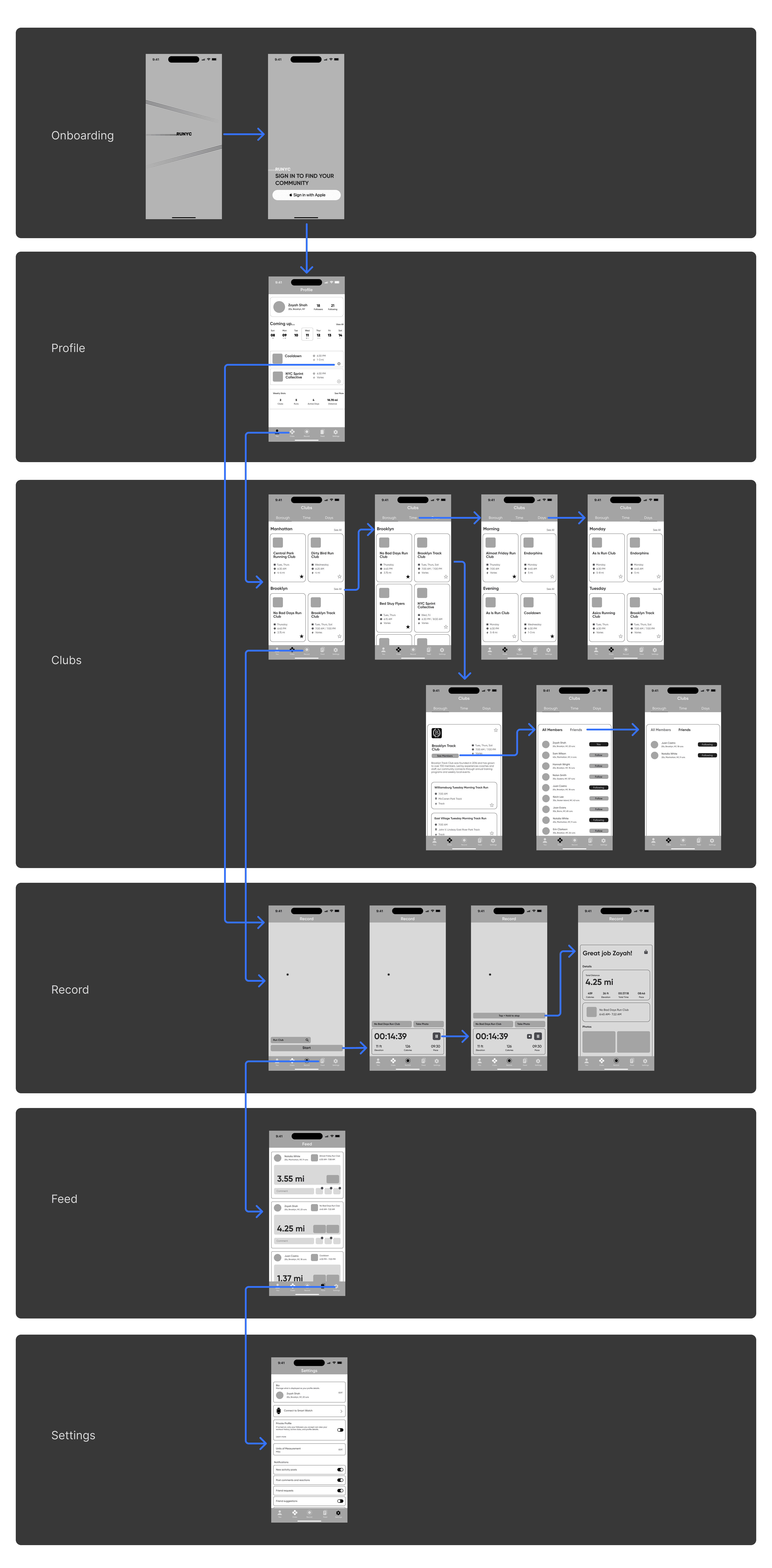
Before touching any UI, I mapped the core flows: onboarding, neighborhood feed, active run, and post-run. This is where I was able to visualize the architecture.
03
Lo-fi wireframes
I built wireframes in Figma to stress-test the architecture before committing to visual design. The main thing I was working out was how to seamlessly integrate the social aspect making it feel fully intentional throughout the app rather than a layer on top. I was able to achieve this by embedding social and community features organically in multiple places of the app.
04
High-fidelity design in Figma
I built the full UI in Figma. Here I was able to detail out the main pages of the app and start to really build out the features.
05
Bringing it to life with Claude Code
Once I had a Figma prototype I was confident in, I wanted to push it further, past click-through interactions into something that actually felt like using an app. I worked with Claude Code to translate the designs into a coded, interactive prototype. This process forced me to articulate design decisions I'd made intuitively in Figma: spacing logic, component behavior, conditional states, and think through them more precisely. The act of making it real surfaced gaps I hadn't noticed in static screens.
problem statement
Despite the abundance of running clubs in New York City and fitness apps on the market, runners often struggle to find and connect with clubs that suit their interests and schedules. Current solutions lack a unified platform that helps users discover clubs and encourages ongoing interaction within those communities.
RUNYC solves this by providing a single, user-friendly app that integrates discovery, social interaction, and activity tracking, fostering a more connected running community across the city.
user personas
🙋🏽♀️ The Newcomer
->
New to NYC & looking for a community to feel apart of
->
Wants to find beginner-friendly run clubs in her neighborhood
->
Needs a user-friendly platform that highlights beginner-friendly run clubs and up to date schedules.
🏆 The Competitive Athlete
->
Competitive runner looking to improve performance.
->
Wants to find running partners who can match his pace and push him to improve.
->
Difficulty in finding run clubs with runners of similar skill levels.
->
Needs tracking features to monitor running performance.
🏃🏽♀️ The Social Runner
->
Enjoys running as a way to relax after a hectic work day and loves meeting new people.
->
Wants to connect with other runners and make new friends.
->
Has difficulty in discovering evening run clubs in her area.
->
Needs a comprehensive directory of run clubs.
Stage 01
Pre-run
Planning & motivation
Stage 02
Setting out
Starting the run
Stage 03
Mid-run
In the city, moving
Stage 04
Finishing
Stopping & saving
Stage 05
Post-run
Social & reflection
Action
Checks weather, decides route from memory or habit
Action
Opens app, hits start, puts phone away
Action
Runs solo, passes familiar faces, nods to regulars on the path
Action
Stops tracker, reviews stats, sometimes posts run on social media
Action
Scrolls Strava, collects kudos from friends, logs in calendar
emotion
Excited
Neutral
Low
Indifferent
Motivated
Flow state
Satisfied
Disconnected
Pain point
No way to see what nearby runners are doing. Defaults to the same run every time
Pain point
Route discovery is the same map every time, not curated.
Pain point
Passes the same runners every time with no way to connect.
Pain point
The finish screen is a data dump. Numbers with no meaning or story.
Pain point
Social feed shows people you already follow, not the city you just ran though.
RUNYC Opportunity
Surface runs from run clubs nearby
RUNYC Opportunity
Show people joining the runs for each event. Create ambient pre-run social awareness
RUNYC Opportunity
Ambient people count. Community signal without stealing focus from the run
RUNYC Opportunity
Show the social aspect of the run after finishing. The club, neighborhood, stats
RUNYC Opportunity
Social tab to interact with other runners
user flow / wireframes
from figma to code / why i built it
I designed and prototyped the first iteration of the RUNYC prototype entirely in Figma and it communicated the visual direction clearly, but then I realized I could make it fully interactive through prompts on Claude to really bring the app to life. I rebuilt RUNYC as a React prototype, implementing every screen, every interaction, and every piece of data from scratch, while staying true to the design I first created in Figma.
This process forced me to make design decisions that I probably wouldn’t have considered while making static screens: how does the Club card behave when it's empty? What happens to the heart state when you navigate away and come back? How do you handle scroll position across tab switches? These are the questions that make it feel like a real app.
04 ∙ prototype
The prototype is fully interactive and includes all five core sections of the app. You can tap, scroll, navigate, and interact with every element.
FEATURE 01
You - Your personal hub
The header shows your name, follower count, and a greeting based on time of day. Below that: a weekly stats card with a bar chart of your mileage, a 7-day "Coming up" calendar showing scheduled runs from your favorited clubs, a horizontal shelf of your clubs, and a recent runs list. Tapping any club or event drills into a detail view. Hearting a club on the Clubs tab immediately reflects here.
FEATURE 02
Clubs
A searchable, filterable directory of NYC run clubs. Filter by borough, time of day, or vibe tags like "Beginner friendly" or "Speed work." Each row shows the club's real logo, name, location, and schedule. Tap to open a detail page with the club description, quick stats (pace, time, distance), upcoming runs, and members. Heart a club to save it — it instantly populates your profile's clubs shelf and coming-up calendar.
FEATURE 03
Feed
A social feed of your friends' recent runs. Each card shows the runner's photo, their club, a map thumbnail with distance overlaid, pace/time/elevation stats, and any caption they added. You can react with an emoji (tap + to open the picker), like the run, or expand comments to read and reply. Below the second card, a "People you may know" section surfaces friends-of-friends with mutual connection context and a follow button.
FEATURE 04
Record
Tap "Record a run" from anywhere to open this screen. Before starting, you can connect the run to a club via a searchable bottom sheet — or skip it and run solo. Once started, a live stats overlay shows distance, elapsed time, and pace updating every second. Controls change contextually: Pause / Stop while running, Resume / Finish while paused. Finishing resets everything back to the pre-run state.
FEATURE 05
Stats
A deeper look at your running data. Tabbed by week, month, and year. Includes a bar chart of daily mileage, summary stats (total distance, time, runs, elevation), personal records, and a "fun facts" card with comparisons like "that's 2.4 miles further than Central Park's loop."
05 ∙ outcome
Taking the Figma designs into code changed how I understood the project. Things that felt resolved in static screens became questions again once they were real. The most useful thing the prototype did was make the run screen feel real. In Figma, the minimal design looked clean, however in a browser, moving between screens, it became obvious that "minimal" needed to be earned. Every element on that screen had to justify its presence, resulting in a few things getting cut in the final pass.
06 ∙ Reflection
Using Claude to build the prototype was genuinely interesting as a design process. I came into it thinking of it as a translation step to simply take the Figma and make it interactive. It ended up being more like another design pass. Describing a component to Claude precisely enough to implement it forced me to think through edge cases I'd glossed over.
RUNYC also sharpened something I've been thinking about more broadly: the difference between social mechanics and actual community design. Adding likes and follows is easy, but designing the conditions under which strangers feel like neighbors is a much harder and more interesting problem. This prototype was a first pass at it.
View more work
RUNYC
Cultivating a community through running. An app to discover run clubs in NYC, interact with community members, and log your runs.
UI/UX
Prototyping
React
01 ∙ overview
RUNYC is a mobile app that allows you to discover run clubs across the 5 boroughs of New York City, interact with community members, and log your runs. This project began as a Figma prototype and evolved into a fully interactive coded prototype built in React with the help of Claude Code.
As the popularity of running clubs continues to grow, the need for a centralized platform to discover and engage with these communities has become increasingly apparent. RUNYC addresses this need by offering users a comprehensive directory of run clubs, facilitating interaction among members, and fostering a sense of community. RUNYC aims to enhance the experience of run clubs and promote active participation in a community of like-minding individuals.
This case study covers the design thinking behind the concept, the key decisions made in Figma, and what it was like to bridge from mockups to a working prototype using AI (Claude Code) as a collaborator.
02 ∙ challenge
I started by auditing the existing landscape for both running apps and social media apps where runners typically find run events: Strava, Instagram, Apple Fitness. Each app has social features, including followers, kudos, clubs, leaderboards. But in every case, the social layer sits on top of the tracking layer rather than beneath it. The product leads with your data. Community is something you have to seek out.
The gap I kept coming back to: none of these apps help you connect with runners near you unless you already know them. The city is full of people running the same routes at the same times.
Strava
->
Groups section contains a lot of outdated groups
->
Interactivity with friends is great
->
Too many clicks within each page of the app, making some features difficult to navigate.
->
Have to individually search for each run club. Need to already know the name of the club so discovering new ones is a challenge.
->
Hard to stay up to date since posts and stories can get lost in the feed.
Apple Fitness
->
Can easily track runs through Apple Watch
->
Interactivity with friends is great
->
Only includes individual friends, but cannot create groups or interact with friends from within the app.
Design question
What if community wasn't a feature you opted into, but rather the default lens through which the whole running experience was framed?
03 ∙ process
From competitive audit to Figma prototype to working prototype.
01
Competitive audit
I went through Strava, Instagram, and Apple fitness screen by screen and mapped their social and discovery features side by side. Across Strava and Apple Fitness, social was an add-on to tracking, not as a core design principle. Instagram is used to find running events, but discovery is extremely challenging if you don't know what to search for. That analysis gave me a clear north star: design social-first from the ground up.
02
User flows in Figma
Before touching any UI, I mapped the core flows: onboarding, neighborhood feed, active run, and post-run. This is where I was able to visualize the architecture.
03
Lo-fi wireframes
I built wireframes in Figma to stress-test the architecture before committing to visual design. The main thing I was working out was how to seamlessly integrate the social aspect making it feel fully intentional throughout the app rather than a layer on top. I was able to achieve this by embedding social and community features organically in multiple places of the app.
04
High-fidelity design in Figma
I built the full UI in Figma. Here I was able to detail out the main pages of the app and start to really build out the features.
05
Bringing it to life with Claude Code
Once I had a Figma prototype I was confident in, I wanted to push it further, past click-through interactions into something that actually felt like using an app. I worked with Claude Code to translate the designs into a coded, interactive prototype. This process forced me to articulate design decisions I'd made intuitively in Figma: spacing logic, component behavior, conditional states, and think through them more precisely. The act of making it real surfaced gaps I hadn't noticed in static screens.
problem statement
Despite the abundance of running clubs in New York City and fitness apps on the market, runners often struggle to find and connect with clubs that suit their interests and schedules. Current solutions lack a unified platform that helps users discover clubs and encourages ongoing interaction within those communities.
RUNYC solves this by providing a single, user-friendly app that integrates discovery, social interaction, and activity tracking, fostering a more connected running community across the city.
user personas
🙋🏽♀️ The Newcomer
->
New to NYC & looking for a community to feel apart of
->
Wants to find beginner-friendly run clubs in her neighborhood
->
Needs a user-friendly platform that highlights beginner-friendly run clubs and up to date schedules.
🏆 The Competitive Athlete
->
Competitive runner looking to improve performance.
->
Wants to find running partners who can match his pace and push him to improve.
->
Difficulty in finding run clubs with runners of similar skill levels.
->
Needs tracking features to monitor running performance.
🏃🏽♀️ The Social Runner
->
Enjoys running as a way to relax after a hectic work day and loves meeting new people.
->
Wants to connect with other runners and make new friends.
->
Has difficulty in discovering evening run clubs in her area.
->
Needs a comprehensive directory of run clubs.
Stage 01
Pre-run
Planning & motivation
Stage 02
Setting out
Starting the run
Stage 03
Mid-run
In the city, moving
Stage 04
Finishing
Stopping & saving
Stage 05
Post-run
Social & reflection
Action
Checks weather, decides route from memory or habit
Action
Opens app, hits start, puts phone away
Action
Runs solo, passes familiar faces, nods to regulars on the path
Action
Stops tracker, reviews stats, sometimes posts run on social media
Action
Scrolls Strava, collects kudos from friends, logs in calendar
emotion
Excited
Neutral
Low
Indifferent
Motivated
Flow state
Satisfied
Disconnected
Pain point
No way to see what nearby runners are doing. Defaults to the same run every time
Pain point
Route discovery is the same map every time, not curated.
Pain point
Passes the same runners every time with no way to connect.
Pain point
The finish screen is a data dump. Numbers with no meaning or story.
Pain point
Social feed shows people you already follow, not the city you just ran though.
RUNYC Opportunity
Surface runs from run clubs nearby
RUNYC Opportunity
Show people joining the runs for each event. Create ambient pre-run social awareness
RUNYC Opportunity
Ambient people count. Community signal without stealing focus from the run
RUNYC Opportunity
Show the social aspect of the run after finishing. The club, neighborhood, stats
RUNYC Opportunity
Social tab to interact with other runners
user flow / wireframes
from figma to code / why i built it
I designed and prototyped the first iteration of the RUNYC prototype entirely in Figma and it communicated the visual direction clearly, but then I realized I could make it fully interactive through prompts on Claude to really bring the app to life. I rebuilt RUNYC as a React prototype, implementing every screen, every interaction, and every piece of data from scratch, while staying true to the design I first created in Figma.
This process forced me to make design decisions that I probably wouldn’t have considered while making static screens: how does the Club card behave when it's empty? What happens to the heart state when you navigate away and come back? How do you handle scroll position across tab switches? These are the questions that make it feel like a real app.
04 ∙ prototype
The prototype is fully interactive and includes all five core sections of the app. You can tap, scroll, navigate, and interact with every element.
FEATURE 01
You - Your personal hub
The header shows your name, follower count, and a greeting based on time of day. Below that: a weekly stats card with a bar chart of your mileage, a 7-day "Coming up" calendar showing scheduled runs from your favorited clubs, a horizontal shelf of your clubs, and a recent runs list. Tapping any club or event drills into a detail view. Hearting a club on the Clubs tab immediately reflects here.
FEATURE 02
Clubs
A searchable, filterable directory of NYC run clubs. Filter by borough, time of day, or vibe tags like "Beginner friendly" or "Speed work." Each row shows the club's real logo, name, location, and schedule. Tap to open a detail page with the club description, quick stats (pace, time, distance), upcoming runs, and members. Heart a club to save it — it instantly populates your profile's clubs shelf and coming-up calendar.
FEATURE 03
Feed
A social feed of your friends' recent runs. Each card shows the runner's photo, their club, a map thumbnail with distance overlaid, pace/time/elevation stats, and any caption they added. You can react with an emoji (tap + to open the picker), like the run, or expand comments to read and reply. Below the second card, a "People you may know" section surfaces friends-of-friends with mutual connection context and a follow button.
FEATURE 04
Record
Tap "Record a run" from anywhere to open this screen. Before starting, you can connect the run to a club via a searchable bottom sheet — or skip it and run solo. Once started, a live stats overlay shows distance, elapsed time, and pace updating every second. Controls change contextually: Pause / Stop while running, Resume / Finish while paused. Finishing resets everything back to the pre-run state.
FEATURE 05
Stats
A deeper look at your running data. Tabbed by week, month, and year. Includes a bar chart of daily mileage, summary stats (total distance, time, runs, elevation), personal records, and a "fun facts" card with comparisons like "that's 2.4 miles further than Central Park's loop."
05 ∙ outcome
Taking the Figma designs into code changed how I understood the project. Things that felt resolved in static screens became questions again once they were real. The most useful thing the prototype did was make the run screen feel real. In Figma, the minimal design looked clean, however in a browser, moving between screens, it became obvious that "minimal" needed to be earned. Every element on that screen had to justify its presence, resulting in a few things getting cut in the final pass.
06 ∙ Reflection
Using Claude to build the prototype was genuinely interesting as a design process. I came into it thinking of it as a translation step to simply take the Figma and make it interactive. It ended up being more like another design pass. Describing a component to Claude precisely enough to implement it forced me to think through edge cases I'd glossed over.
RUNYC also sharpened something I've been thinking about more broadly: the difference between social mechanics and actual community design. Adding likes and follows is easy, but designing the conditions under which strangers feel like neighbors is a much harder and more interesting problem. This prototype was a first pass at it.